Know what’s next. Then actually do it.
Raphael is the AI agent that takes everything on your plate, turns it into a plan you can keep, clears your distractions when it’s time, and does the small stuff itself.
It lives in your Mac’s notch. For students and leaders with too much to juggle.
Too much to do, and no plan for it. Or a plan, and you still don’t start.
Either way, what matters slips. Raphael takes on both.
Nothing slips.
Press ⌥Space over anything, in class, in a meeting or mid-chat, and tell Raphael. It goes on your list and gets a time.
Or press Control-Option-Space to send your whole screen. On iPhone, press the Action button.
Biology reading at 9:00, then the lecture.
Added. You have a clear stretch on Thursday.
Added Physics worksheetnow 16:00 to 18:00
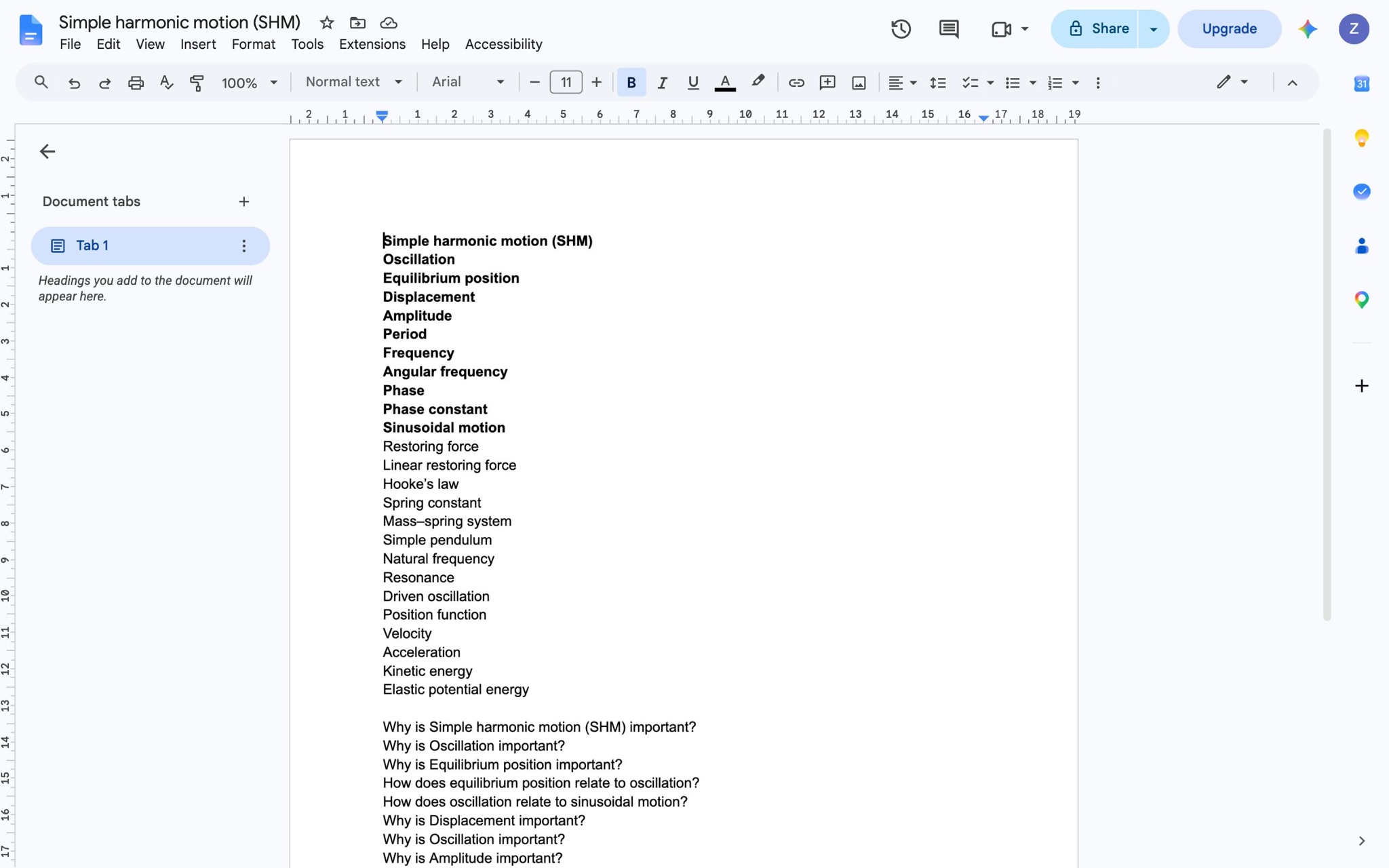
Your SHM notes list the terms, and every why question is still open. I put an hour for them on Wednesday at 19:00.
Added Physics: SHM notesnow 19:00 to 20:00
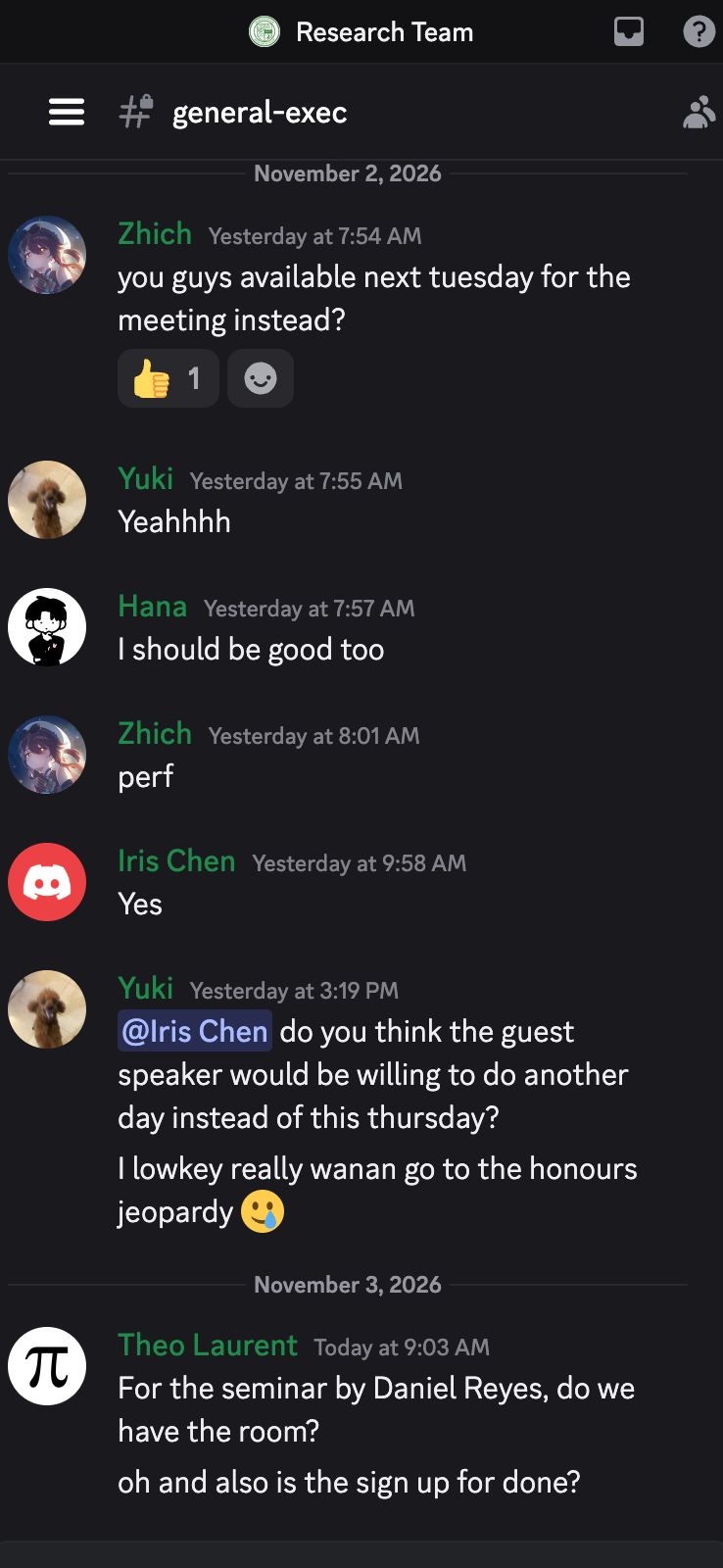
The exec meeting moves to next Tuesday. I put it on your plan.
Moved Exec meetingnow 17:00 to 18:00
Biology reading at 9:00, then the lecture.
Added. You have a clear stretch on Thursday.
Added Physics worksheetnow 16:00 to 18:00
Your SHM notes list the terms, and every why question is still open. I put an hour for them on Wednesday at 19:00.
Added Physics: SHM notesnow 19:00 to 20:00
The exec meeting moves to next Tuesday. I put it on your plan.
Moved Exec meetingnow 17:00 to 18:00
The midterm is Thursday, and Biology has gone quiet. I moved Gym so you have two hours for prep tonight.
Moved Gymnow 18:00 to 19:00
Not now
14:01You set this time aside for
Physics: SHM notes
You start, and you stay on it.
One press closes what distracts you on your Mac, opens your work and blocks your phone. If you drift, Raphael asks once.
The small stuff gets done without you.
Hand off drafts, research and comparisons. Raphael works in the background while you stay on what matters. On Essentials and Complete it has its own computer, so it keeps going when yours is closed.
Here’s the reply to Prof. Ruiz. It isn’t sent: could we move Thursday’s meeting to Monday at 16:00? The midterm is Thursday morning.
Three readings, one chapter each. The second works through the mass on a spring, which your notes skip. Start there.
Two places have a table for eight on Friday at 19:00, Noodle Bar on Main Street and Casa Verde. Casa Verde takes a deposit.
Your days get better.
Each night you see what you planned next to what really happened. Raphael helps you fix tomorrow’s plan, and protects your sleep.
Today
Tuesday, November 3It’s time for sleep.
Your phone stays closed until morning.
Free on your Mac. Always on in the cloud.
Join the waitlist| What you get | FreeYours, on your Mac.When the waitlist opens | EssentialsAlways on. | CompleteNothing to bring. |
|---|---|---|---|
| Runs on your Mac, while it’s on | Included | Not included | Not included |
| Your own AI key | Included | Not included | Not included |
| Your own AI subscription | Included | Included | Included |
| Runs in the cloud, always on | Not included | Included | Included |
| Blocks your phone even when your Mac is off | Not included | Included | Included |
| Its own computer | Not included | Included | Included |
| AI usage included | Not included | Not included | Included |
I built Raphael because I kept losing track of my tasks across 8 subjects, two clubs and two projects. Homework from class and tasks from meetings got put off and forgotten, or done at the last minute. There was so much to do that I avoided planning at all. When a calendar notification came up, I ignored it and kept chatting. When I did start, I couldn’t stop myself from going to scroll, and I very rarely fell into flow.



Every app I tried worked for me: Grok Bot, Claude Code, ChatGPT. None worked with me. So I’d like to share the system that finally got me doing what I said I’d do.
Join the waitlist.
Know what’s next. Then actually do it.